

Your POS system can help reduce costs by providing the sales data you need to make informed decisions about staffing, purchasing, and daily operations. By understanding where your money is going and how your restaurant performs, you can use those insights to make practical changes that lower expenses without compromising service or the guest experience.
This article is for restaurant operators wanting to learn how to:
- Lower labor costs by scheduling staff around actual demand
- Reduce food waste and eliminate unnecessary software costs
- Identify savings opportunities and evaluate payment processing fees
Let's look at five ways your POS can help you save your bottom line.
1. Lower labor costs by scheduling around sales
Labor is one of the largest expenses for any restaurant, but cutting hours across the board can potentially leave you understaffed when you need your team the most. Your POS system can help you lower labor costs by showing you when your restaurant is busiest, when it starts to slow down, and where you can make adjustments to meet demand.
Start by reviewing your POS reporting, specifically your sales data by day of the week and time of day. Compare those patterns with scheduled labor hours and labor cost percentages to see whether you're staffing appropriately for customer demand. You may find that certain shifts are consistently overstaffed while others could use additional coverage.
WATCH: SpotOn's Real-time POS Reporting Helps Avize Boost Profits and Reduce Costs
For example, if sales regularly slow down between 2 p.m. and 4 p.m. but pick up sharply around 5 p.m., you may want to adjust employees’ start times to later in the day. This reduces the number of people on the clock during slower periods while giving your team the support they need when the dinner rush hits.
The goal isn’t to schedule fewer people; it’s to use your POS system’s reporting to schedule the correct number of people when they’re needed, helping you manage labor without sacrificing your quality of service. To further save time and automate this process, you can also use employee scheduling software that integrates with your POS.
2. Reduce food waste by connecting sales and inventory
The other largest expense for restaurants is food costs. While you can't control what suppliers charge, you can control how much food you purchase, prepare, and waste. By connecting your POS system with inventory management software, you get the information you need to make better purchasing decisions and keep food costs manageable.
WATCH: Kalei's Kitchenette Cuts Costs with SpotOn Profit Assist
Here are three ways to use your POS and inventory data to control food costs:
- Adjust purchasing: Review sales tracking data to identify popular menu items and underperforming dishes, then build purveyor orders based on expected demand.
- Mitigate excess prep: Use historical sales trends to estimate how much food you'll need for each shift, reducing the amount of prepared food that goes unsold.
- Investigate inventory discrepancies: Compare expected ingredient usage with in-house inventory counts and recorded waste to identify potential problems with portion sizes, spoilage, or inaccurate inventory records.
For example, if you sell 100 chicken sandwiches requiring 6 ounces of chicken each, your inventory software can calculate that you should have used approximately 37.5 pounds of chicken. If your inventory records show 45 pounds used, that's a 7.5-pound difference and you need to find out why. With accurate recipes, consistent inventory counts, and precise waste records, you have the information needed to start tracking down where that extra chicken went.
3. Cut technology costs by reducing overlapping tools
Paying separately for online ordering, employee scheduling, reporting, loyalty programs, and more can get very expensive, very quickly. Many modern POS systems offer these capabilities within a single restaurant management platform, giving you an opportunity to reduce monthly software costs by eliminating unnecessary subscriptions.
Start by reviewing the tools you’re currently paying a monthly fee for and compare their features with what’s available through your POS provider. You might discover that your POS software includes online ordering or employee management tools that you’re paying another company to provide. Before making any changes, though, consider whether those built-in features offer the capabilities your restaurant needs.
You should also think about how the savings can extend beyond recurring fees. When your scheduling, ordering, and reporting tools operate within a connected ecosystem, managers will spend less time manually transferring information between platforms, comparing data across different software programs, and managing separate accounts. That means fewer admin tasks competing for their attention throughout the day.
However, consolidating digital tools doesn’t automatically equate to lower total costs. Some POS providers charge additional monthly fees for advanced features, while others require third-party integrations. Compare the total cost of your current subscriptions against the new cost of replacing them, including any setup fees, integration charges, or early termination fees.
You’re aiming to eliminate overlapping software costs without giving up useful capabilities or creating new expenses that outweigh the savings.
4. Use P&L analysis to find your next savings opportunity
Your POS system should show you how much money your restaurant has coming through the door, but revenue alone doesn’t tell you how much money you’re keeping. A profit and loss (P&L) statement, typically generated through your accounting software, fills in the gaps by showing your revenue alongside expenses such as food, labor costs, rent, utilities, and other operating costs.
WATCH: How to Read a Restaurant P&L (Profit and Loss) Statement
Reviewing your P&L statements alongside sales data from your POS can help you spot expenses that are trying to grow faster than revenue. For example, let’s say your restaurant generates $100,000 in monthly sales, with food costs accounting for 30% of revenue. If food costs rise to 34% the following month while sales remain unchanged, you’re spending an additional $4,000 on food without bringing in any more revenue.
That’s a significant increase and is worth investigating. Have purveyors raised their prices? Has food waste increased? Have portion sizes changed? Digging into your purchasing records, recipe costs, and menu performance will help you figure out where the increase is coming from and what adjustments might be necessary.
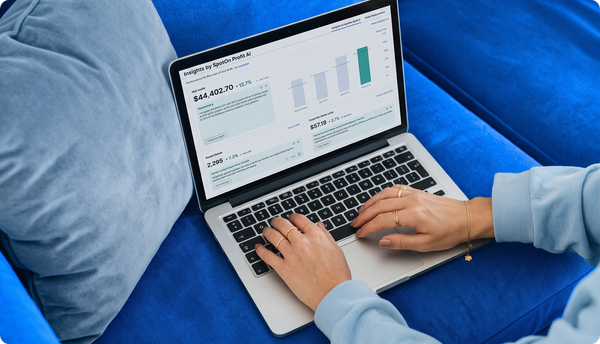
SpotOn Profit Assist can help you with this process by leveraging AI to analyze your restaurant’s P&L data and highlighting possible savings opportunities. Rather than you manually searching through sheets of financial statements for expenses that need attention, you can use Profit Assist’s insights to prioritize changes that could improve your profitability.
WATCH: Profitability Analysis Software for Restaurants | SpotOn Profit Assist
The value of P&L analysis is knowing which expenses deserve a closer look before making changes to your business operations.
5. Check your software fees and payment processing costs
Even if your POS system is helping you control operational expenses, you could still be paying more than necessary for the technology itself. Comparing your current POS system cost and payment processing fees with quotes from other providers can help you determine whether you're getting competitive pricing.
Start with your software subscription. Review your monthly software fees, including charges for online ordering, reporting, and other add-ons. Then check your contract for hardware costs, setup fees, integration charges, and early termination fees that could affect the cost of switching providers. Request quotes from other POS providers for a comparable setup, making sure you're comparing the same features, equipment, and contract terms. To avoid hidden fees, ask what's included in the quoted price, which features cost extra, and whether any charges increase after an introductory period.
Next, compare your payment processing costs. Use your restaurant's monthly transaction volume, average check size, and mix of in-person and online payments to request accurate quotes. In-person transactions typically have lower processing fees than online payments, so the types of transactions your restaurant handles can affect your overall costs. Compare the percentage charged on each sale, per-transaction charges, and additional fees, including any PCI compliance fees or payment gateway fees. Even small differences in transaction fees can add up when you're processing thousands of payments each month.
Once you have those comparisons, talk with your current provider about your payment processing rates and software pricing. A lower quote doesn't automatically mean a better deal, so consider the features, integrations, and support included before making a decision.
Choose a POS that helps you keep more of what you earn
The right POS system will bring together sales data, employee management, inventory management, financial reporting, loyalty programs, marketing, and more, giving you a clearer picture of how your restaurant is performing and where you have opportunities to reduce costs.
When comparing POS systems, don’t focus solely on the advertised price and look at the total cost of ownership. A system with a lower monthly subscription fee may seem like the better deal, but additional POS software costs, limited features, and expensive integration can quickly offset those perceived savings. The right choice should support your business operations while giving your team the tools they need without it becoming needlessly expensive.
SpotOn offers a connected restaurant technology ecosystem with practical restaurant AI built in to help operators manage more of their restaurant’s daily operations from one place. Our restaurant management tools and integrations support online ordering, reporting, labor management, and inventory management, while SpotOn’s proactive AI helps identify potential savings opportunities and then dig deeper with AI-powered chat.
The best POS software isn't necessarily the cheapest; it's the one that offers transparent pricing, supports the way your restaurant operates, and helps you keep more of what you earn.
Frequently asked questions on how to reduce costs using your POS
Here are quick answers to the most common questions asked about reducing costs using your restaurant's POS system.
How do I reduce costs with my POS?
You can reduce costs with your POS system by using sales reports and AI-powered insights to make better decisions about staffing, purchasing, and daily operations. Reviewing sales trends can help you schedule employees around customer demand, while connecting your POS with inventory management software makes it easier to manage inventory and reduce food waste. You can also save money by eliminating unnecessary software subscriptions and using financial reports to identify expenses that need attention.
How can a restaurant POS help reduce labor costs?
Your POS system can help reduce labor costs by showing you when your restaurant is busiest and when business slows down. Comparing sales reports with employee schedules helps you identify shifts where you may be overstaffed or understaffed. You can then adjust staffing levels to better match customer demand, improving operational efficiency without sacrificing service. To automate this process and save time, you can also sync your POS with integrated employee scheduling software.
Can a POS system help reduce food waste?
Yes. Connecting your POS system with inventory management software helps you track ingredient usage and make more accurate purchasing decisions. Some systems offer advanced inventory management features that connect menu sales to ingredient quantities, making it easier to identify discrepancies and avoid overordering. You can also use historical sales reports to plan how much food to prepare for each shift, reducing waste from unsold meals.
Can consolidating restaurant technology lower costs?
Yes. Consolidating restaurant technology can help you save money by eliminating software subscriptions for features already included in your POS system. Bringing online ordering, scheduling, and reporting into one platform can also improve operational efficiency by reducing the time managers spend switching between programs or entering the same information twice. Before canceling any subscriptions, compare the features and costs to make sure you're not losing functionality your restaurant needs.
How can POS data support restaurant P&L analysis?
Your POS system provides the sales data you need to understand how your restaurant's revenue compares with its expenses. By reviewing POS reports alongside your P&L statements, you can identify rising food and labor expenses, track changes in profitability, and spot potential hidden costs that may be cutting into your margins. This gives you a clearer picture of where to focus your cost reduction strategies. AI-powered tools like SpotOn Profit Assist can do this automatically for you and provide proactive insights on where to save on costs.
How much does a restaurant POS system cost?
Restaurant POS software subscriptions can range from free to $200 or more per month, depending on the provider and features included. You'll also need to account for upfront hardware costs, which can range from basic card readers to complete terminals with a receipt printer, plus any installation costs. Depending on the equipment and setup, POS hardware can cost anywhere from around $50 to $2,500 or more. Some providers offer free plans, while others use custom pricing based on your restaurant's needs. Before choosing a system, ask about hidden costs such as paid add-ons, equipment charges, and contract fees that could increase your overall expenses.
How do I know if my POS fees are competitive?
Start by reviewing your POS bills regularly to identify unnecessary subscriptions, unused features, or other recurring charges you're still paying for. Then request quotes from other providers to compare software pricing and payment processing costs. If your provider offers a discount for annual billing, compare the potential savings against your current monthly plan, keeping contract terms in mind. Pay attention to different pricing models, including flat-rate pricing, and ask your payment processor about opportunities to negotiate lower transaction fees. Make sure you're comparing similar services and contract terms so you can determine whether switching your POS would actually save money.