

Labor is one of a restaurant's biggest controllable costs, and the schedule is where most of that money gets decided. Build it on gut feel and you may end up with three servers standing around on a slow Tuesday and a slammed bar on Friday with nobody available to run food.
The best restaurant scheduling software fixes that by building shifts from your sales data, keeping you on the right side of labor laws, and giving your team an easy way to swap shifts. For most independent restaurants, that's SpotOn Teamwork. If you have a smaller team and don’t need the robust features in Teamwork, 7shifts also integrates directly with SpotOn.
Key takeaways
- Best overall: SpotOn Teamwork builds schedules from real-time POS sales data, with labor forecasting, compliance tools, and tip management for $3 per employee per month.
- Best dedicated scheduling platform: 7shifts, which integrates directly with SpotOn to build schedules from your sales data.
- Best for small restaurants: Schedulefly, for simple scheduling and team messaging.
- The unexpected pick: Restaurant365, for groups that use its full suite of restaurant management tools.
- Best for enterprise and franchise groups: HotSchedules by Fourth.
- Best free option: Homebase, for small, single-location restaurants.
- What to look for: Scheduling built on POS sales data, labor forecasting, break and overtime compliance, and a mobile app your staff will use.
| Tool | Best for | Restaurant size | Starting price |
|---|---|---|---|
| SpotOn Teamwork | POS-integrated scheduling with forecasting, compliance, and tips | Independents to multi-location groups | $3 per employee per month, with a $75 monthly minimum |
| 7shifts | A dedicated scheduling platform that integrates with SpotOn | Single-location to multi-location | Free plan; paid from $39.99/location/month (billed annually) |
| Schedulefly | Simple scheduling and team messaging | Small independents | From $30/month (up to 19 staff) |
| Restaurant365 | Scheduling inside a full restaurant management suite | Growing and multi-location groups | Bundled with R365 plans (custom quote) |
| HotSchedules by Fourth | Enterprise labor management | Enterprise and franchise | Custom quote |
| Homebase | Free basic scheduling | Small, single-location | Free plan; paid from $30/location/month |
What to look for in restaurant scheduling software
We focused on scheduling tools built for restaurants, not general hourly workforce apps. We make SpotOn Teamwork, so we held every tool on this list, including our own, to the same five criteria:
- Built for restaurants: Support for the way restaurants run, including front- and back-of-house roles, split shifts, and tipped employees.
- Sales and labor data: Whether managers can build schedules from POS sales data and forecasts instead of guesswork.
- Labor compliance: Break rules, overtime alerts, and clock-in controls that help reduce legal risk.
- A mobile app staff will use: Shift swaps, time-off requests, and availability updates from a phone.
- Clear pricing: How easy it is to know what you'll pay before you sign.
1. SpotOn Teamwork
Best for: Independent restaurants and growing groups that want scheduling connected directly to their POS sales data.
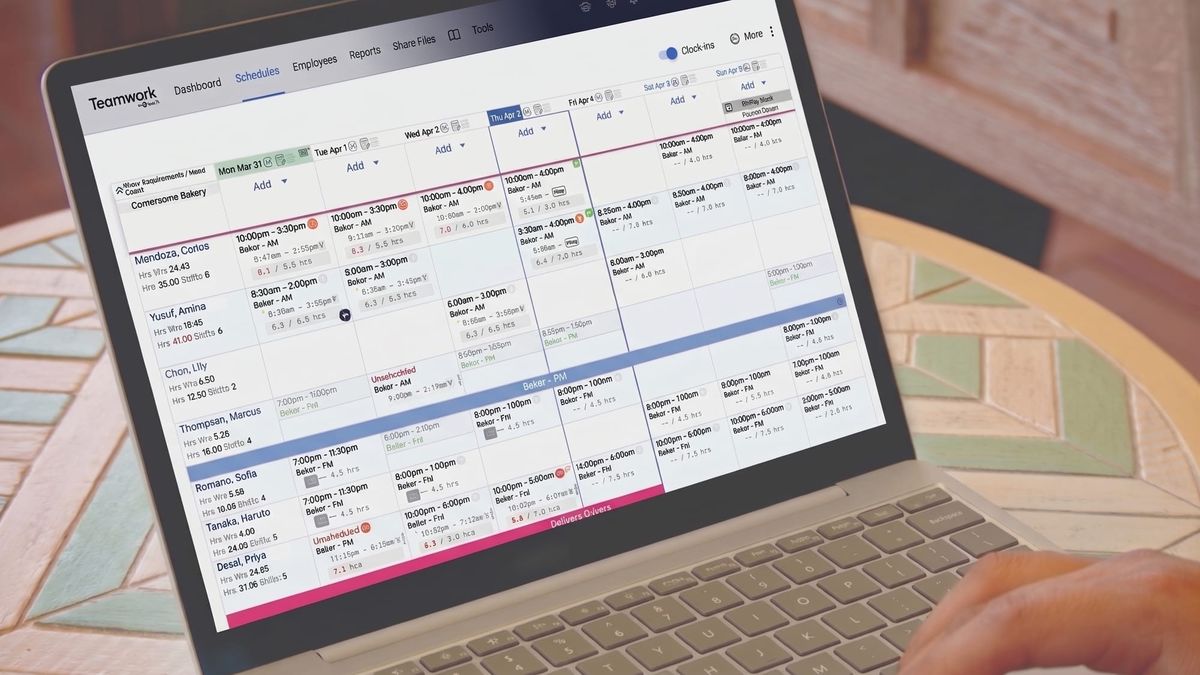
SpotOn Teamwork is restaurant scheduling software that connects directly to the SpotOn POS platform, built for independent restaurants. Instead of building next week's schedule from memory, managers see real sales data and labor forecasts side by side, so they can cover peak hours without overstaffing the slow ones. Clock-ins sync from the POS, which keeps scheduled and actual labor aligned and helps managers catch overtime before it happens.
Key features:
- Sales-driven scheduling: Build schedules from real POS sales data to avoid overstaffing and protect your labor budget.
- Cost projections: View labor forecasts, set budgets, and block schedules that exceed your labor cost limits.
- Clock-in enforcement: Block early clock-ins and require manager approval to prevent overtime and unworked labor.
- Labor compliance: Enforce required breaks and send reminders to reduce legal risk.
- Faster schedule building: Use templates, copy past schedules, and drag and drop shifts, then publish to your team.
- Employee app: Staff can view upcoming shifts, swap or pick up shifts, and request time off from their phones.
- Multi-location staffing: See staffing needs across locations and schedule employees where they're needed most.
Results from SpotOn clients:
- Adalina in Chicago saves more than $500 a week on labor.
- The Mudpuppy in Vonore, Tennessee cut labor spend by 7% and saves 54 hours a month on payroll.
- Managers at COTE Korean Steakhouse in New York save more than 7 hours a week.
Pricing: $3 per employee per month, with a $75 monthly minimum and $0 setup fee for SpotOn POS clients.
WATCH: Scheduling and Labor Management for Restaurants | SpotOn Teamwork
2. 7shifts
Best for: Restaurants that want a dedicated scheduling platform, or already use 7shifts, and still want schedules built on SpotOn sales data.
7shifts is one of the best-known scheduling platforms built for restaurants, and it's a scheduling tool SpotOn integrates with directly. If your team already works in 7shifts, or you'd rather run scheduling in a standalone app, the SpotOn and 7shifts integration means you don't give up real-time POS data to do it.
What the SpotOn integration adds:
- Schedules built on real sales data: 7shifts pulls SpotOn sales data to help forecast demand, spot over- and understaffing patterns, and build schedules that match what's happening in your restaurant.
- Automatic data sync: Employee information, wages, and hours sync between SpotOn and 7shifts every five minutes, cutting the manual entry that leads to payroll mistakes.
- Real-time labor cost visibility: Managers see labor costs against sales as the day unfolds and can adjust before the numbers get out of hand.
- One place for team communication: Staff view schedules, swap shifts, and message each other in one app, which keeps managers in the loop without extra effort.
- Cleaner payroll: With wages and hours synced from SpotOn, payroll data is ready to go each pay period.
Pricing: Free plan for one location with up to 15 employees. Paid plans start at $39.99 per location per month when billed annually, or $44.99 billed monthly, with employee limits by tier. Payroll and tip management are add-ons on lower tiers.
3. Schedulefly
Best for: Small independent restaurants that only need simple scheduling and team messaging.
Schedulefly is built for independent restaurants that want a straightforward way to post schedules, handle shift swaps, and keep the team in the loop. It doesn't try to be a full labor management platform, and that's part of the appeal. Without deep forecasting or POS-driven scheduling, it's easy to learn and quick to roll out.
A good fit if: You run one location, write the schedule yourself, and mostly need to get it in front of your team and stop chasing swaps over text.
Consider something else if: You want schedules built on sales data or tighter labor cost controls as you grow.
Pricing: Flat monthly pricing by staff size, from $30 per month for up to 19 staff to $60 per month for 60 to 79 staff, with every feature included. There are no contracts or setup fees, and there's a 30-day free trial. Restaurants with 80 or more staff get custom pricing.
4. Restaurant365: The unexpected pick
Best for: Restaurants that want scheduling inside Restaurant365's full suite of restaurant management tools.
Most operators know Restaurant365 for accounting and back-office software, not scheduling. But its scheduling product holds up well, too. Managers build schedules from sales forecasts, and a Suggested Hours feature recommends staffing levels based on forecasted sales and sales-per-labor-hour goals. Once actual labor imports from the POS, managers can compare it against the schedule to see where costs drifted.
Key features:
- Forecast-based scheduling: Staffing suggestions tied to forecasted sales and sales-per-labor-hour goals.
- Scheduling rules: Preset rules support compliance and limit shift swaps to employees in similar positions.
- Manager approval: Managers can set themselves as the final approver on every schedule change.
- Labor reporting: Reports on actual vs. scheduled labor, sales per labor hour, and labor as a percentage of sales.
- Mobile access: Employees view schedules and submit availability and shift requests from their phones.
Pricing: Restaurant365 scheduling isn't sold on its own. It comes bundled in operations plans such as Core Operations and Essential, alongside R365 Inventory and POS Connect, or as a Workforce Management add-on to accounting-focused plans through a custom quote.
That makes R365 best suited to groups already using, or planning to adopt, its broader platform. For a single-location restaurant that only needs scheduling, it's likely more system than you need.
5. HotSchedules by Fourth
Best for: Enterprise restaurant groups and franchise operations.
HotSchedules is one of the longest-running names in restaurant scheduling, and it now operates under the Fourth brand as part of Fourth's workforce management suite. It's built for large, complex operations, with forecasting, scheduling, and labor management designed to run across many locations and brands.
A good fit if: You manage a large multi-unit or franchise operation and want scheduling bundled with enterprise back-office tools.
Consider something else if: You're an independent restaurant or a small group. Pricing is quote-based and the platform is designed around enterprise needs, so it's often more than a smaller operation needs.
Pricing: Custom quote.
6. Homebase
Best for: Small, single-location restaurants looking for a free way to start.
Homebase is a popular scheduling and time-tracking app with a free plan for one location and up to 10 employees. It's easy to set up, and staff can see their schedules and clock in from their phones. Homebase serves many kinds of hourly businesses, not just restaurants, so it works best for owners who value simple and low-cost over restaurant-specific features like POS-driven forecasting or tip management.
A good fit if: You're a small restaurant moving off paper or spreadsheets and want to keep costs at zero.
Consider something else if: Labor costs are a growing concern and you want schedules shaped by your sales data.
Pricing: Free Basic plan for one location and up to 10 employees. Paid plans start at $30 per location per month and add advanced scheduling, team communication, and labor cost tools.
How to choose restaurant scheduling software for your size
The right tool depends less on feature lists and more on how big your operation is and how much labor costs are squeezing your margins.
Small and single-location restaurants
Start with how you schedule today. If you write the schedule yourself and mostly need to share it and manage swaps, a simple tool like Schedulefly or Homebase can do the job. If labor costs are eating into profits, choose a tool that builds schedules from your sales data, like SpotOn Teamwork.
Growing restaurants and small groups
Once you add a second location or a bigger team, you need more than a shared calendar. Look for labor forecasting, compliance tools, multi-location staffing, and payroll sync. SpotOn Teamwork covers all of that inside your POS platform, and 7shifts gives you a dedicated scheduling app that still runs on SpotOn data.
Multi-location and enterprise groups
At this size, think about how scheduling fits your broader systems. If you already run Restaurant365 for accounting and inventory, its scheduling tools keep everything in one place. Large franchise and enterprise groups may want HotSchedules by Fourth. Teamwork's multi-location staffing and labor reporting also scale as you add locations.
Whatever your size, the biggest factor is whether your scheduling tool can see your sales. For a deeper look at building schedules around sales forecasts, read our guide to the best way to schedule restaurant staff.
Build smarter schedules with SpotOn Teamwork
Your sales data already shows when your restaurant gets busy, and your schedule should reflect it. SpotOn Teamwork connects scheduling to your POS sales data, so you can cover the rush, protect your labor budget, and give your team the flexibility they want from their phones.
DISCLAIMER: Everything here is just for informational purposes. The links and graphics may not be accurate and we encourage you to do your own research. Also, we can't guarantee results from following our advice. Always consult a professional for your specific situation.
Frequently asked questions
What's the best restaurant scheduling software?
SpotOn Teamwork is the best restaurant scheduling software for most independent restaurants, because it builds schedules from real-time POS sales data and includes labor forecasting, compliance tools, and tip management for $3 per employee per month. For restaurants that want a dedicated scheduling app, 7shifts also integrates directly with SpotOn.
What is restaurant scheduling software?
Restaurant scheduling software helps managers build and publish staff schedules, manage shift swaps and time-off requests, and track labor costs. The best tools are built around restaurant roles and connect to your POS, so schedules reflect actual sales instead of guesswork.
How much does restaurant scheduling software cost?
Prices range from free plans for basic scheduling to custom quotes for enterprise platforms. SpotOn Teamwork costs $3 per employee per month, with a $75 monthly minimum and $0 setup fee for SpotOn POS clients.
What's the best free restaurant scheduling software?
Homebase offers a free plan for one location with up to 10 employees, and 7shifts offers a free plan for one location with up to 15 employees. Free tools usually cover basic scheduling and time tracking but don't include sales-based forecasting or POS integration.
Can restaurant scheduling software reduce labor costs?
Yes. Using your POS sales data to build schedules is one of the most direct ways to reduce restaurant costs. Scheduling software matches staffing to forecasted sales, flags overtime before it happens, and blocks early clock-ins. SpotOn clients using Teamwork have seen the difference: Adalina in Chicago saves more than $500 a week on labor, and The Mudpuppy in Vonore, Tennessee cut labor spend by 7%.
Should my scheduling software integrate with my POS?
Yes, if controlling labor costs matters to you. A POS integration lets you build schedules from real sales data, sync clock-ins, and compare scheduled labor to actual labor without manual entry.
How does scheduling software help with labor law compliance?
Many tools enforce required breaks, send break reminders, and alert managers before an employee goes into overtime. They also keep a record of hours worked, which helps if you're ever audited. Labor laws vary by state and city, so check the requirements where you operate.